
# 创建自定义气泡
气泡是一种弹出界面,外观类似漫画中的对话气泡。它有一个指向块的“尾部”,以及一个容纳任意 SVG 元素的“头部”。
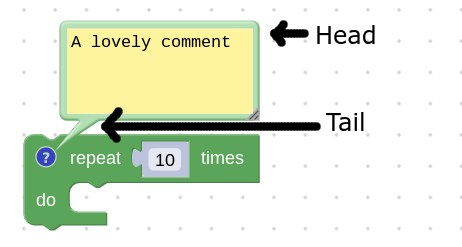
如果内置气泡不满足需求,可以通过继承 Bubble 类创建自定义气泡。
# 创建视图
气泡视图就是气泡“头部”中的全部 SVG 元素。这些元素应在气泡构造函数中创建,并挂到 this.contentContainer 下,这样销毁气泡时可自动清理。
Blockly.utils.dom 模块提供了更简洁的 SVG 创建接口。
class MyBubble extends Blockly.bubbles.Bubble {
  // See the Blockly.bubbles.Bubble class for information about what these
  // parameters are.
  constructor(workspace, anchor, ownerRect) {
    super(workspace, anchor, ownerRect);

    this.text = Blockly.utils.dom.createSvgElement(
          Blockly.utils.Svg.TEXT,
          {'class': 'my-bubble-class'},
          this.contentContainer);
    const node = Blockly.utils.dom.createTextNode('some text');
    this.text.appendChild(node);
  }
}
# 设置尺寸
需要通过 setSize 设置气泡尺寸,这样外框才能正确包裹内容。应在构造阶段设置,并在气泡内部界面元素尺寸变化时重新设置。
constructor(workspace, anchor, ownerRect) {
  // Create the view elements... (see above)

  const bbox = this.text.getBBox();
  this.setSize(
    new Blockly.utils.Size(
      bbox.width + Blockly.bubbles.Bubble.BORDER_WIDTH * 2,
      bbox.height + Blockly.bubbles.Bubble.BORDER_WIDTH * 2,
    ),
    true
  );
}
# 释放气泡资源
气泡销毁时应清理 DOM 元素和外部引用。追加到 this.contentContainer 的元素会自动销毁,其他引用需要在 dispose 中手动清理。
dispose() {
  super.dispose();

  // Dispose of other references.
  this.myArbitraryReference.dispose();
}