
# 覆盖注释图标
你可以覆盖内置注释图标。例如,你可能希望注释的弹出气泡 (opens new window)使用不同的展示方式。
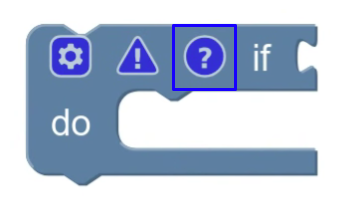
要覆盖注释图标,需要继承 CommentIcon,重写 ICommentIcon 中的部分方法,并注册你的新图标。
提示
Blockly 内置有三类图标:注释、警告、变形器。只有注释图标支持覆盖。
# 继承 CommentIcon
先从继承 CommentIcon 开始:
class MyCommentIcon extends Blockly.icons.CommentIcon {
  constructor(sourceBlock) {
    super(sourceBlock);
  }
}
# 重写 ICommentIcon 与 Icon 中的方法
为了定制图标,可以重写 ICommentIcon 中的方法(下文会分别说明),也可以重写 Blockly.icons.Icon 中的方法(见创建自定义图标)。
不要重写 getType,它必须返回 Blockly.icons.IconType.COMMENT。
# 文本
ICommentIcon 要求注释图标必须有文本。getText 需要返回注释文本,setText 需要设置文本并更新相关视觉表现。
getText() {
  return this.text;
}

setText(text) {
  this.text = text;
  this.myRenderMethod();
}
# 气泡
你的自定义注释图标必须实现 IHasBubble 接口以支持序列化。即使你的图标技术上没有气泡,也建议在类上保存可见性状态,这样加载存档时不会丢失“注释是否打开”的信息。
bubbleIsVisible() {
  return this.bubbleVisible;
}

setBubbleVisible(visible: boolean) {
  this.bubbleVisible = visible;
}
关于气泡,见 Use pop-up bubbles (opens new window)。
ICommentIcon 还要求实现 getBubbleSize 和 setBubbleSize。同样,即使没有真实气泡,也建议保存该状态以保持序列化一致性。
getBubbleSize() {
  return this.bubbleSize;
}

setBubbleSize(size) {
  this.bubbleSize = size;
  this.myRenderMethod();
}
ICommentIcon 还要求实现 getBubbleLocation 和 setBubbleLocation,用于读写气泡在工作区中的位置。
setBubbleLocation(location) {
  this.bubbleLocation = location;
}

getBubbleLocation() {
  return this.bubbleLocation;
}
# 保存和加载
你的自定义注释图标必须实现 ISerializable 接口。状态结构应符合 CommentState。
saveState() {
  return {
    text: this.text,
    pinned: this.bubbleVisible,
    height: this.bubbleSize.height,
    width: this.bubbleSize.width,
    x: this.bubbleLocation.x,
    y: this.bubbleLocation.y,
  }
}

loadState(state) {
  this.setText(state.text);
  this.setBubbleVisible(state.pinned);
  this.setBubbleSize(new Blockly.utils.Size(state.width, state.height));
  this.setBubbleLocation(new Blockly.utils.Coordinate(state.x, state.y));
}
关于图标序列化,见 Save and load icons (opens new window)。
# 注册你的图标
最后,先注销原有注释图标,再注册你的注释图标,让 Blockly 能实例化你的实现。注销使用字符串 'comment',注册使用 IconTypes.COMMENT。
Blockly.icons.registry.unregister('comment');
Blockly.icons.registry.register(Blockly.icons.IconType.COMMENT, myCommentIcon);
注册后,Blockly 会用你的图标替代内置注释图标。比如用户在右键菜单点击 “Add Comment” 时,或调用 myBlock.setCommentText() 时,都会使用新图标实现。